Friday, 22 January 2016

A GENUINE WEBSITE TO EARN MONEY FROM ONLINE (working in INDIA,USA,UK,AUSTRALIA,CANADA )

A GENUINE WEBSITE TO EARN MONEY FROM ONLINE 

These days we are familiar with lot of mobile apps and money earning tricks from online.Lot of websites and apps promise us money for doing their promotions and downloading their apps or force us to use our credit card details to recharge mobile and get money back . i also tried few apps and money earning websites and found most of these websites are fake ,they do not give us anything ,mobile apps were better for earning talk time but none of them lasts .only worked for few weeks or months

Finally i started to use this website "swagbucks.com" and found it is genuine and working or me
so i am sharing this site here in my blog because you can trust these guys

About swagbucks Swagbucks.com is a California based online rewards destination by Prodege LLC. It enables users to earn a virtual currency called Swag Bucks by performing a variety of online activities, including searching, shopping, taking surveys, playing games, and discovering online content, and then to redeem those Swag Bucks for retail gift cards, PayPal cash, or other rewards. As of November 2015, Swagbucks.com is ranked by Alexa Internet as the 153th most visited website in the United States and the 675th most trafficked website globally.As of March 2015, the site serves more than 12 million members and has awarded more than $100 million in retail gift card rewards to its members. The site operates in the U.S,CANADA,UK,INDIA,AUSTRALIA

Proof 
i am using this site for a while i bought several things from ebay ,flipkart and amazon this is a screenshot of my flipkart wallet you can see my balance i added 4 coupons already

it was 950 sb points to get a 500 RS flipkart coupon
1000 sb points for a 500 RS amazon coupon
but you can get 250 RS coupons too it worth 500 sb average


What do you need ? 

1. a good internet connection (if you can browse facebook it is enough)

2. pc/laptop (any pc or laptop will work its better to have a web camera on it because some surveys                           need it )

3.patience (points aren't easy to come at first but eventually you will understand so at least do it in a                       
  month)

4.regular use (there is daily points and daily surveys you should try it everyday it is sure points )

5.honesty (do not change your details because they will check it you are cheating or not so especially                     age,date of birth ,family details .no need to be true but always put same info thats it  )

6 . create a mail just for doing this and use that mail to register first time

7.use firefox browser  if you are using chrome there is less chances in my experience(i recommend to
                 
use 2 browsers in your computer 1 for regular use and firefox browser for swagbucks to use                      otherwise you will get more confused )
8. you can set swagbucks search on default in this firefox browser because searching can give you
    
points ,it is powered by yahoo search ,just search anything after a while you get points its                       depends on hours you search 1sb to 10 sb points will be awarded (they do not give points every           hour once you get it try after 2-4 hours)


How to earn ?

There are many ways to earn , you are earning sb points and you can use these points to buy gift cards from their reward store (gift coupons include amazon,flipkart,ebay,paypal,jabong and many )

Earning:
  • Searching- Swagbucks hosts a custom search engine that will periodically reward registered users with random amounts of Swag Bucks. The selection of winners is completely random, and it is emphasized that searching more often will not necessarily increase the odds of winning.
  • Special Offers- Members may earn Swag Bucks by completing various offers made by third-party companies via the SwagBucks website or mobile app.
  • Swagbucks TV- Members can discover and watch videos selected by the user, in a similar fashion to YouTube.
  • Surveys- Members may complete market-research surveys from third parties to receive Swag Bucks. Generally, surveys take longer to complete than other activities, and consequently the payouts are larger on average.
  • Shopping- Members may use the Shop and Earn feature to shop at a number of popular online e-commerce retailers (Walmart, Target, Apple, Kmart, etc.) and receive a set amount of Swag Bucks per dollar spent, in a “cash-back” format.
  • Games- Members may play online casual games to earn Swag Bucks.
  • Swag Codes- Special text codes can be periodically found on the Swag Bucks network and can be entered into a special Swag Codes box in the menu bar to earn Swag Bucks. These can appear and expire anytime.
  • Daily Goals- A meter on the home page shows an amount of Swag Bucks that is the user's goal for that day. If the goal is reached, bonus Swag Bucks will be awarded at the start of the next month. These bonuses accumulate, and meeting the goal for many days in a row will earn additional bonuses.
  • Hourly Random Winner- Users that are logged in to the site can check the SwagBucks blog every hour. If their username and avatar is displayed in the "Hourly Winner" section, the user can click "Claim Your Swagbucks" and may earn 1,000 Swag Bucks. The hourly random winner is now seen in the blog

if you join the site you will get more information from the site itself

HOW TO JOIN  ?

CLICK HERE

If you have any doubts ask in the comments


Thanks for reading .

Saturday, 12 December 2015

WINDOWS 10 OS FOR XIAOMI MI4

WINDOWS 10 OS FOR XIAOMI MI4 


It was a news from 2014 and now it is confirmed

Xiaomi and Microsoft entered into a partnership which allowed the company’s Windows 10 OS to be installed on Xiaomi’s Mi4 flagship.


 Xiaomi also announced today that it will make the Windows 10 ROM available for its Xiaomi Mi Note series. So, in the coming weeks, there will be at least three different models running on Microsoft’s Windows 10 OS — the Mi4, Mi Note and the Mi Pad 2.


Here are some pictures of the Xiaomi Mi4 running on the Windows 10 Mobile operating system directly from Xiaomi. So far everything looks good, but we will have to wait for some more feedback to see whether there are any major flaws or bugs in the OS


Download 


Thanks for reading .

LI-FI 100 TIMES FASTER THAN WIFI

Li-Fi - 100 times faster than Wi-Fi


This new technology is going to change the internet era!

"One of the big advantages of Li-Fi is the fact that, unlike Wi-Fi, it does not interfere with other signals, so could be utilized on aircraft and in other places where interference is an issue."


A new method of delivering data, which uses the visible spectrum rather than radio waves, has been tested in a working office. Li-fi can deliver internet access 100 times faster than traditional wi-fi, offering speeds of up to 1Gbps (gigabit per second)


It requires a light source, such as a standard LED bulb, an internet connection and a photo-detector. It was tested this week by Estonian start-up Velmenni, in Tallinn. Velmenni used a li-fi-enabled light bulb to transmit data at speeds of 1Gbps.


Laboratory tests have shown theoretical speeds of up to 224Gbps. It was tested in an office, to allow workers to access the internet and in an industrial space, where it provided a smart lighting solution.


Speaking to the International Business Times, chief executive Deepak Solanki said that the technology could reach consumers "within three to four years". The term Li-Fi was first coined by Prof Harald Haas from Edinburgh University, who demonstrated the technology at a Ted (Technology, Entertainment and Design) conference in 2011. His talk, which has now been watched nearly two million times, showed an LED lamp streaming video. Prof Haas described a future when billions of light bulbs could become wireless hotspots.


Thanks for reading ..


Wednesday, 14 October 2015

5 APPS TO MANAGE SCREEN BRIGHTNESS AND PROTECT YOUR EYES

5 APPS TO MANAGE SCREEN BRIGHTNESS AND PROTECT YOUR EYES

How much time do you spend with your smartphone? Probably a lot. And if you are anything like me, majority of your usage must happen during night. In case you didn’t know, staring at a bright screen during night or in a dark room can strain your eyesAlthough ambient light sensor adjusts the screen brightness according to the light around you, during night even the 0 percent brightness seems like a lot. In this article, we have compiled a list of some of the best apps that can reduce the brightness below 0 percent and give you total control over your screens brightness.

1. Lux


Lux has been around for a while now and is one of the best brightness apps I’ve ever encountered. Automatic screen brightness adjustment is its best feature. Unlike Android’s default auto-brightness, Lux gives you complete control over the brightness settings
Another cool thing is that it can reduce the brightness below the minimum brightness. It can go even darker than the lowest brightness. In addition to great adjustment options, the app can change the hue of the screen so that your phone projects red light instead of blue, putting less strain on your eyes at night.
For $3, you can upgrade to Lux’s pro version and unlock some extra features like astronomer mode for stargazers, using the camera to read ambient light, showing warmer colors at night, etc.

2. Cobret


Cobrets is a widget that allows you to toggle between different brightness presets. There are six predefined brightness modes : Minimum (8%), Cuarter (25%), Medium (45%), Maximum (100%), Automatic, Nightly Filter, and Diurnal Filter.
The Automatic mode uses Android’s auto-brightness settings to manage the screen brightness. The Nightly filter mode sets brightness value to 0 and applies black overlay filter to the screen, so you get the brightness level even lower than system’s default. The Diurnal mode applies yellow filter over your screen which makes it easier for your eyes to use your phone in a dark room. Cobrets also allows you to manually change all brightness and overlay filter values, including filter colors and opacity levels.

3. IntelliScreen


IntelliScreen allows you to customize screen timeout intervals depending on device position, lighting conditions, and which apps are currently  running. It also has the option to always keep the screen on when the app is running in the foreground. Screen timeouts for each app can also be customized.
By using various sensors that come in a phone, it can automatically decide when to turn the screen on and when to turn it off, just like Gravity Screen. However, this is a premium option that is only available if you decide to upgrade IntelliScreen to the premium version.


4,Twilight


If you’ve heard of f.lux Twilight is more like that . Instead of reducing the brightness level below minimum value, it converts the blue light coming from the bright screen into warm shades of red and orange depending on the time of day. It require access to your location to keep track of sunrise and sunset to adjust screen temperature perfectly. After sunset, it starts adding layer of warm colors to the screen automatically.
If you choose to go for the pro version, you’ll get some additional features like adjustable transition time, predefined profiles, etc.

5. Screen Filter

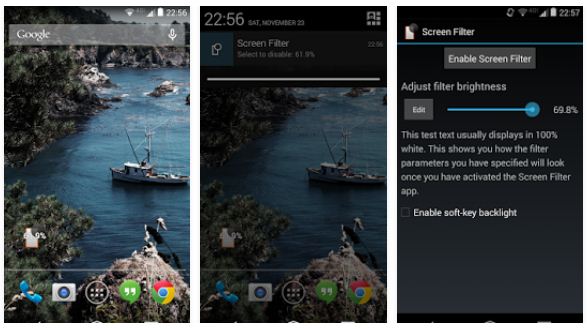
This is the app I’m currently using. If you don’t need all the fancy features and just need a black filter over your screen to reduce the screen brightness below minimum level, Screen Filter is the app for you. Tap the app icon to activate it and tap again to deactivate it. The slider that manages the screen brightness is available in the notification area when the app is activated, from there you can increase or decrease the brightness level 

thanks for reading ..


Monday, 12 October 2015

5 Tips to Protect Your Eyes While Using Smartphones


5 Tips to Protect Your Eyes While Using Smartphones


It’s no secret that staring at the digital screen from a close range all day long have a negative effects on your eyes, after all, that’s what we’ve been taught since we were kids – ” don’t sit close to the TV” said my parents. And I know that they were not alone.Fast forward to today, things haven’t changed much, it’s just smartphones instead of TV. Almost everyone today spends most of their day (and night) staring at their smartphones. So the question is “does staring at your smartphone screen all day really damage your eyes?” Short answer : yes. For a detailed answer read the article

Here are 5 surefire ways to protect your eyes while using smartphones :

1. Adjust Screen Brightness

The first and important thing to do is to adjust your screen’s brightness according to your surrounding. Setting the brightness too low or too much can stress your eyes and can cause problem maintaining focus. To adjust your smartphone’s brightness according to your environment, go to phone’s settings option, then to display, and turn on adaptive brightness. Now the screen brightness will adjust automatically depending on the light around you. Another option is to use an app that manages the screen brightness better than the default brightness settings.

2. Hold Your Smartphone at a Distance

This might seem a bit odd, holding your smartphone at a distance, but this trick can help lot. On average, an user hold its smartphone only about 8 inches from their face. Try holding it at least 15 inches away from your eyes. If you feel any difficulty in reading texts you can always increase the size of texts from settings menu. This might seem awkward at first but once you get used to it, it will help for sure.

3. The 20-20-20 Rule

20-20-20 rule is quite effective. What this rule suggests is instead of staring at your screen all the time, take breaks on regular interval. After every 20 minutes of staring at your screen, take a break of 20 seconds, and look at something which is 20 feet away. Doing so results in relaxation of your eye muscles

4. Blink, Blink, Blink

According to a study, we tend blink about a third less than we normally would when we stare at our smartphone screens. Blinking often keeps the eyes moist and reduce dryness. So keep your eyes moist by blinking while staring at your screen.

5. Get Protective Coatings

In case you don’t know matte screen protector film or corning Gorilla glass have anti-glare feature. If your phone doesn’t have that (which is very rare as most of the smartphones come with corning gorilla glass) you can buy anti-glare coating and carefully put it on your phone’s screen. That should help reduce screen glare.
If you were glasses you can also get that anti-glare coating on your glasses.
So these are some tips that we suggest to protect your eyes. If you know of any other tip, do let us know in the comments.

Thursday, 8 October 2015

IPS VS AMOLED

IPS VS AMOLED 


What is the Difference Between IPS and AMOLED?

We have been getting many questions with regards to mobile display technology the most frequent one being what is the difference between IPS and AMOLED, so we decided we should write an article detailing the pros and cons of both and try to make it as understandable as possible.


First off IPS:
IPS (in-plane switching) the technology was made primarily for LCD (liquid crystal display) to overcome the limitations of the regular LCD or TFT-LCD display, the problem with the regular display TFT-LCD was a slow response time, that means a degraded touch response and bad news for gamers as games usually require screens with good response times.
Another thing was a limited viewing angle, you could make out the screen if you’re looking at it straight ahead with a little variation, but move to the side a bit and you wouldn’t be able to see the screen…it was great for guys who’d be texting one girl while sitting with another… J  But now is the age of sharing is caring where you wanna show off what you’re watching…. so something had to be done…
IPS was the answer allowing for better response times meaning good touch response and better gaming. Also it allowed for a better viewing angle meaning you could watch the screen while having others watch it too…yippee!!
Here is a brief note down of the IPS technology:
Pros:
  1. Better response time as compared to regular LCDs
  2. Better Color reproduction
  3. Better viewing angle
  4. Sharper Images
Cons:
  1. Requires a stronger backlight
  2. More power hungry
  3. Screens (cell phones) are usually much more thicker (bulkier) due to backlight source
                                  IPS LCD                      REGULAR LSD

Now AMOLED:
AMOLED or (Active Matrix Organic Light Emitting Diode) is an upgrade to OLED, this tech basically consists of organic compounds which when are introduced to an electric charge produce luminosity or light. AMOLED was the tech that allowed for smart-phones to become even sleeker, basically since it does not require any backlight as compared to its IPS counterpart it is less bulky.  At the same time it provided better viewing angles and better contrast as compared to the simple LCD. The main factor that really set apart the AMOLED was its power consumption, it uses less battery power as compared to the IPS tech or regular LCDs.


Here is a Sum UP of AMOLED tech:
Pros:
  1. No Backlight Required
  2. Screen is slimmer, less bulky phone
  3. No backlight, less battery usage, greater battery life
  4. Great Contrast
Cons:
  1. Difficult to produce, more expensive tech
  2. Images Not as sharp IPS
  3. Less Bright as compared to IPS, so less daylight visibility
  4. Display Colors Degrade over time.
 Remarks:
The funny thing about technology is that it’s always advancing in one way or another and sometimes its so fast that you’re always trying to catch up, for example you probably just bought the most advanced smartphone in the world and a couple of months later some other company or maybe even the same launches an even more sophisticated device. The same way display tech is also dependent on other tech, and it has to continuously evolve to cope up with the new processors and gpu which allow for faster refresh rates and better color processing. As we write this article there is a Super IPS display tech already developed to counter the cons of the IPS tech and a Super AMOLED to counter the cons of the AMOLED tech.


So when you reach that Super stage as in most high end devices it gets really difficult to point out visible differences as both are trying to overcome their drawbacks…..

Conclusion:
In a general summary we can say that…….
IPS is known for its better color production, cheap cost of production, better daylight visibility, sharper image quality and higher resolution support
AMOLED screens stand for better battery life, slimmer and sleek design, greater contrast, darker blacks, and better response time.


Thanks for reading .

Monday, 20 July 2015

UNDERGROUND CREW RACING GAME

UNDERGROUND CREW RACING GAME 


Underground crew -take part in illegal street race.
drive your sport car along night streets of a huge city and try to get the finish line first Become the best street racer in this Android game.Challenge the strong rivals and outrun them at any price .step on the gas and rush along the track at crazy speed.Be careful on the road and avoid collisions with other vehicles and other obstacles.Get money for victories in races.Buy different cars.upgrade theircharacteristics and change their appearance .


Game features :


-7 powerful cars 

-Realistic physics

-Hard tracks 

-High quality sound

                                               screenshots


How to install :

-Install apk and paly

-support android 2.3 and higher


Download links

click here